Common Errors & Solutions
Troubleshoot common error messages and issues in ReturnMate with step-by-step solutions.
This guide covers common error messages you may encounter in ReturnMate and how to resolve them.
RMA Errors
"Order not found"
Error: Customer enters order number but system says order not found.
Causes:
- Order number format incorrect
- Order from different store
- Order sync delay from Shopify
Solutions:
- Verify exact order number (including # if required)
- Check order exists in Shopify
- Wait 5 minutes and retry (sync delay)
- Manually search in admin using email address
- Check if order is from the correct store
"Return window expired"
Error: Return request rejected due to expired return window.
Causes:
- Order outside return policy timeframe
- Policy configured incorrectly
Solutions:
- Verify order date vs return policy
- If valid exception, manually create RMA in admin
- Review policy settings if window seems wrong
- Consider warranty claim if defect-related
"Item not eligible for return"
Error: Specific item cannot be returned.
Causes:
- Product marked as final sale
- Product type excluded from returns
- Return rule blocking item
Solutions:
- Check product tags for "final sale" or "no returns"
- Review return rules for blocking conditions
- Check product type exclusions in settings
- Override manually if exception warranted
"RMA already exists for this order"
Error: Cannot create new RMA because one exists.
Causes:
- Customer already submitted return
- Duplicate submission
Solutions:
- Find existing RMA and share status with customer
- If different items, add to existing RMA
- If completed RMA, check if new return is allowed
Label Generation Errors
"Unable to generate label"
Error: Shipping label creation fails.
Causes:
- Invalid address
- Carrier API error
- Account configuration issue
- Weight/dimensions exceeded
Solutions:
- Verify shipping address is complete and valid
- Check carrier account status and credentials
- Verify package dimensions/weight within limits
- Try alternative carrier
- Check carrier API status page
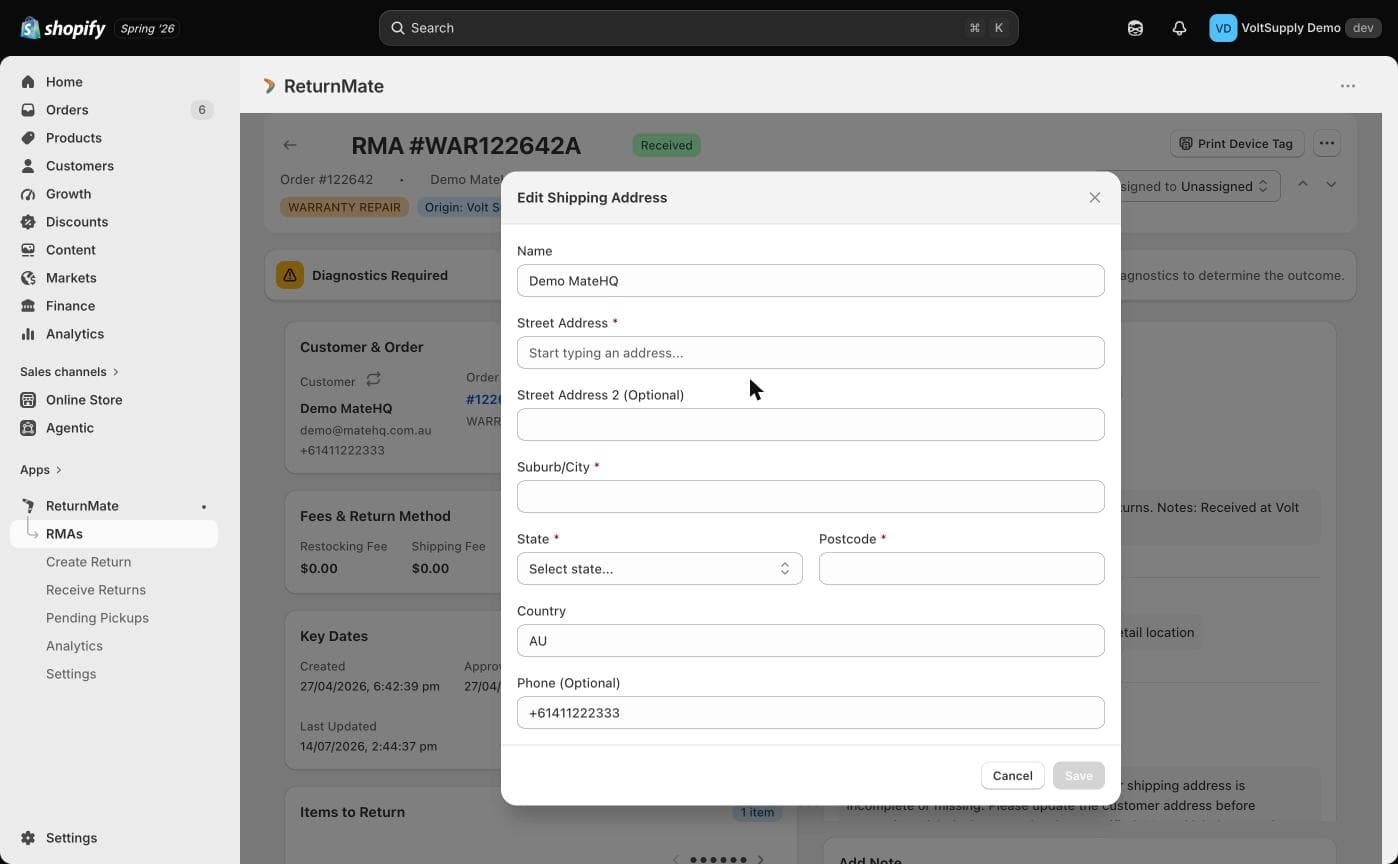
"Address validation failed"
Error: Carrier cannot validate the shipping address.
Causes:
- Incomplete address
- Invalid suburb/postcode combination
- PO Box restrictions
Solutions:
- Have customer verify address
- Try with slightly different formatting
- Check if carrier restricts PO Box delivery
- Manually correct address in admin
- Contact carrier for specific address issues
"Carrier service not available"
Error: Selected carrier/service unavailable for route.
Causes:
- Service doesn't cover destination
- Dangerous goods restrictions
- Temporary service suspension
Solutions:
- Select alternative carrier or service
- Verify destination is within service area
- Check for dangerous goods restrictions
- Review carrier announcements for outages
"Insufficient carrier credit"
Error: Not enough balance to generate label.
Causes:
- Carrier account out of funds
- Billing issue with carrier
Solutions:
- Top up carrier account balance
- Check billing details with carrier
- Contact carrier about account status
Refund Errors
"Refund failed"
Error: Unable to process refund to customer.
Causes:
- Payment method expired
- Shopify API error
- Amount exceeds available
Solutions:
- Retry refund after a few minutes
- Check Shopify for payment status
- Verify refund amount doesn't exceed order total
- Issue refund directly in Shopify if needed
- Offer alternative refund method (store credit)
"Partial refund not allowed"
Error: Cannot issue partial refund for order.
Causes:
- Order already partially refunded
- Payment provider restrictions
Solutions:
- Check order history for previous refunds
- Calculate remaining refundable amount
- Issue refund via Shopify directly
"Original payment method unavailable"
Error: Cannot refund to original payment method.
Causes:
- Card expired
- Account closed
- A dispute or chargeback is active on the payment gateway
Solutions:
- Offer store credit as alternative
- Request customer bank details for transfer
- Contact customer about payment status
- Check for active disputes in Shopify
Inspection Errors
"Cannot update inspection status"
Error: Unable to save inspection results.
Causes:
- RMA in wrong status
- Concurrent edit conflict
- Missing required fields
Solutions:
- Refresh page and retry
- Ensure RMA status allows inspection
- Complete all required inspection fields
- Check if another user is editing
"Barcode not found"
Error: Scanned barcode doesn't match any RMA.
Causes:
- Wrong barcode scanned
- Label from different system
- RMA not yet created
Solutions:
- Manually search by RMA number
- Check if barcode is from correct source
- Verify RMA exists in system
- Create manual receipt if needed
Integration Errors
"Shopify sync failed"
Error: Unable to sync data with Shopify.
Causes:
- API rate limit reached
- Connection issue
- Permission revoked
Solutions:
- Wait 5 minutes and retry
- Check Shopify app permissions
- Verify API credentials still valid
- Review Shopify API health status
"Gorgias ticket creation failed"
Error: Cannot create support ticket in Gorgias.
Causes:
- Invalid Gorgias credentials
- API rate limit
- Customer email not in Gorgias
Solutions:
- Verify Gorgias API key
- Check Gorgias integration settings
- Ensure customer exists in Gorgias
- Review Gorgias API limits
"Webhook delivery failed"
Error: Webhook not delivered to endpoint.
Causes:
- Endpoint unreachable
- Timeout
- Invalid response
Solutions:
- Check endpoint is accessible
- Verify endpoint returns 200 OK
- Review webhook logs for details
- Test endpoint with manual request
Account & Access Errors
"Session expired"
Error: Logged out unexpectedly.
Causes:
- Inactivity timeout
- Multiple sessions
- Browser issue
Solutions:
- Log in again
- Clear browser cache/cookies
- Try incognito/private window
- Check for multiple tabs/sessions
"Permission denied"
Error: Cannot access feature or perform action.
Causes:
- Role doesn't have permission
- Store access restricted
Solutions:
- Contact admin to review permissions
- Verify correct role assigned
- Check store access settings
- Use appropriate account for action
"Account locked"
Error: Cannot log in, account locked.
Causes:
- Too many failed login attempts
- Admin disabled account
- Security concern flagged
Solutions:
- Wait 30 minutes and retry
- Use password reset
- Contact account administrator
- Check email for security notifications
Performance Issues
"Page loading slowly"
Causes:
- Large data set
- Network issues
- Browser cache
Solutions:
- Refresh page
- Clear browser cache
- Use filters to reduce data
- Try different browser
- Check internet connection
"Export timing out"
Causes:
- Too much data
- Complex report
Solutions:
- Reduce date range
- Add filters to limit data
- Export in smaller batches
- Schedule export for off-peak hours
Getting Help
If you can't resolve an issue:
- Search Help Centre - May have specific article
- Contact Support - support@returnmate.io
- Include Details:
- Error message (exact text)
- Steps to reproduce
- RMA/order numbers involved
- Screenshots if helpful
When contacting support, include any error codes shown. These help us quickly identify and resolve issues.