Return Reasons & Policies
Configure return reasons, eligibility rules, and return policies in ReturnMate.
Return reasons help you understand why customers are returning products and can determine whether a return qualifies for free shipping, requires photos, or needs approval. This guide covers setting up and managing return reasons.
Understanding Return Reasons
Return reasons serve multiple purposes:
- Customer communication - Displayed in the return portal
- Routing logic - Determine who pays for shipping
- Analytics - Track trends and identify product issues
- Approval workflows - Trigger specific review processes
Default Return Reasons
ReturnMate comes with common return reasons pre-configured:
| Reason | Type | Free Shipping |
|---|---|---|
| Changed my mind | Customer | No |
| Doesn't fit | Customer | No |
| Faulty/Defective | Product Issue | Yes |
| Wrong item received | Merchant Fault | Yes |
| Damaged in transit | Carrier | Yes |
| Not as described | Merchant Fault | Yes |
Default reasons can be modified or disabled to match your store's policies.
Configuring Return Reasons
Adding a New Reason
- Go to Settings → Return Reasons
- Click Add Reason
- Complete the configuration form:
Basic Details
- Label - Customer-facing name (e.g., "Size too small")
- Internal Name - For staff reference (optional)
- Description - Help text for customers
- Order - Display order in the list
Reason Type
Select the category that best describes this reason:
- Changed Mind - Customer preference
- Sizing Issue - Fit problems
- Wrong Item - Incorrect product sent
- Damaged in Transit - Carrier damage
- Product Defect - Manufacturing issue
- Not as Described - Listing inaccuracy
- Warranty - Warranty-related returns
Shipping Options
Configure who pays for return shipping:
- Free Shipping - Merchant pays for return label
- Customer Pays - Customer arranges shipping
- Discounted Shipping - Customer pays reduced rate
Requirements
Set what customers must provide:
- Photo Required - Must upload images
- Comment Required - Must provide explanation
- Proof of Purchase - Receipt or order confirmation
Editing Existing Reasons
- Go to Settings → Return Reasons
- Click on the reason to edit
- Make your changes
- Click Save
Disabling Reasons
To hide a reason from customers without deleting it:
- Open the reason settings
- Toggle Active to off
- Save changes
The reason will no longer appear in the return portal but historical data is preserved.
Eligibility Rules
Control when each reason can be selected based on conditions:
Time-Based Rules
Reason: Changed my mind
Condition: Order delivered within last 30 days
Action: Allow reason
Product-Based Rules
Reason: Warranty claim
Condition: Product has warranty_eligible tag
Action: Allow reason
Value-Based Rules
Reason: Free returns
Condition: Order value > $100
Action: Allow free shipping
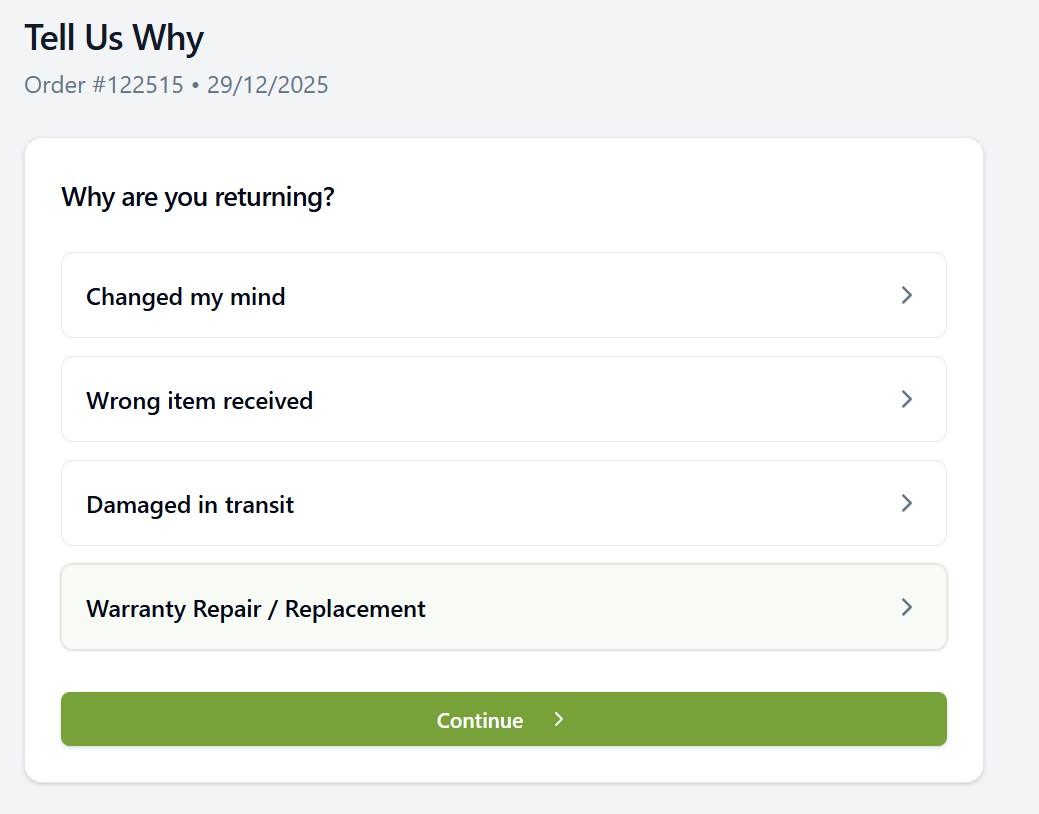
Photo and Documentation Requirements
For certain return reasons, you may want to require photo evidence:
Enabling Photo Upload
- Edit the return reason
- Check Require Photo
- Set minimum number of photos (1-5)
- Add photo guidelines (displayed to customer)
Photo Guidelines Example
"Please provide clear photos showing:
- The complete item
- Any damage or defects
- Product labels/tags
- Original packaging"
Good photo requirements reduce back-and-forth with customers and speed up the approval process.
Approval Workflows
Some return reasons may require manual review before processing:
Auto-Approve
Configure reasons to be automatically approved:
- Changed my mind (within policy window)
- Size exchange requests
- Repeat customers
Require Approval
Configure reasons that need review:
- High-value items
- Damaged in transit claims
- Warranty claims
- Suspicious patterns
See Approvals, Labels & Tracking for approval workflow details.
Return Reason Analytics
Track return reasons to identify trends:
- Go to Analytics and open the Returns tab
- View breakdown by reason
- Filter by:
- Date range
- Product category
- Customer segment
Common insights:
- High "doesn't fit" rates → Size guide issues
- Frequent damage claims → Packaging problems
- Wrong item complaints → Picking process errors
Reason Groups
Organise related reasons into groups for cleaner presentation:
Exchange Group:
- Size too small
- Size too large
- Wrong colour ordered
Refund Group:
- Changed my mind
- Found better price
- No longer needed
Problem Group:
- Wrong item received
- Damaged in transit
- Defective product
Best Practices
- Keep reason labels clear and customer-friendly
- Limit to 8-12 reasons to avoid overwhelming customers
- Require photos for damage/defect claims
- Match free shipping to your published policy
- Review analytics monthly to spot trends
Ensure your return reasons and policies match what's published on your website to avoid customer confusion and potential disputes.