Dangerous Goods Shipping
Configure dangerous goods declarations for products containing lithium batteries or other restricted items.
ReturnMate supports dangerous goods shipping compliance for Shopify merchants, generating transport documents prepared in accordance with the Australian Dangerous Goods Code (Edition 7.9 — mandatory since 1 October 2025). It auto-classifies products by SKU, generates compliant transport documents, blocks non-compliant carriers (Australia Post is automatically blocked for DG items), and applies DG surcharges — all without manual paperwork. Supported classifications include all DG classes from flammable gases (Class 2.1) through lithium batteries (Class 9).
What Are Dangerous Goods?
Dangerous goods are items that pose a risk during transport. Common examples in e-commerce returns include:
| Category | Examples |
|---|---|
| Lithium batteries | Laptops, phones, power tools, e-bikes, vapes |
| Flammable liquids | Perfumes, nail polish, aerosols |
| Compressed gases | Aerosol cans, CO2 cartridges |
| Corrosives | Certain cleaning products |
| Magnetised materials | Speakers, headphones with magnets |
Shipping dangerous goods without proper declarations can result in fines, shipment rejection, or legal liability. Always ensure products are correctly classified.
Lithium Battery Classifications
Most consumer electronics returns involve lithium batteries. Understanding the classification is essential:
UN Numbers
| UN Number | Description | Common Products |
|---|---|---|
| UN3481 | Lithium-ion batteries packed with equipment | Laptops, tablets, phones |
| UN3481 | Lithium-ion batteries contained in equipment | Devices with built-in batteries |
| UN3091 | Lithium metal batteries packed with equipment | Watches, some medical devices |
| UN3091 | Lithium metal batteries contained in equipment | Devices with non-rechargeable lithium |
Packing Instructions
| Packing Instruction | Battery Type | Notes |
|---|---|---|
| PI966 | Li-ion packed with equipment | Most common for returns |
| PI967 | Li-ion contained in equipment | Device has battery installed |
| PI969 | Li-metal packed with equipment | Less common |
| PI970 | Li-metal contained in equipment | Non-rechargeable batteries |
Configuring DG Products
Step 1: Enable DG on Product
When setting up products that require DG declarations:
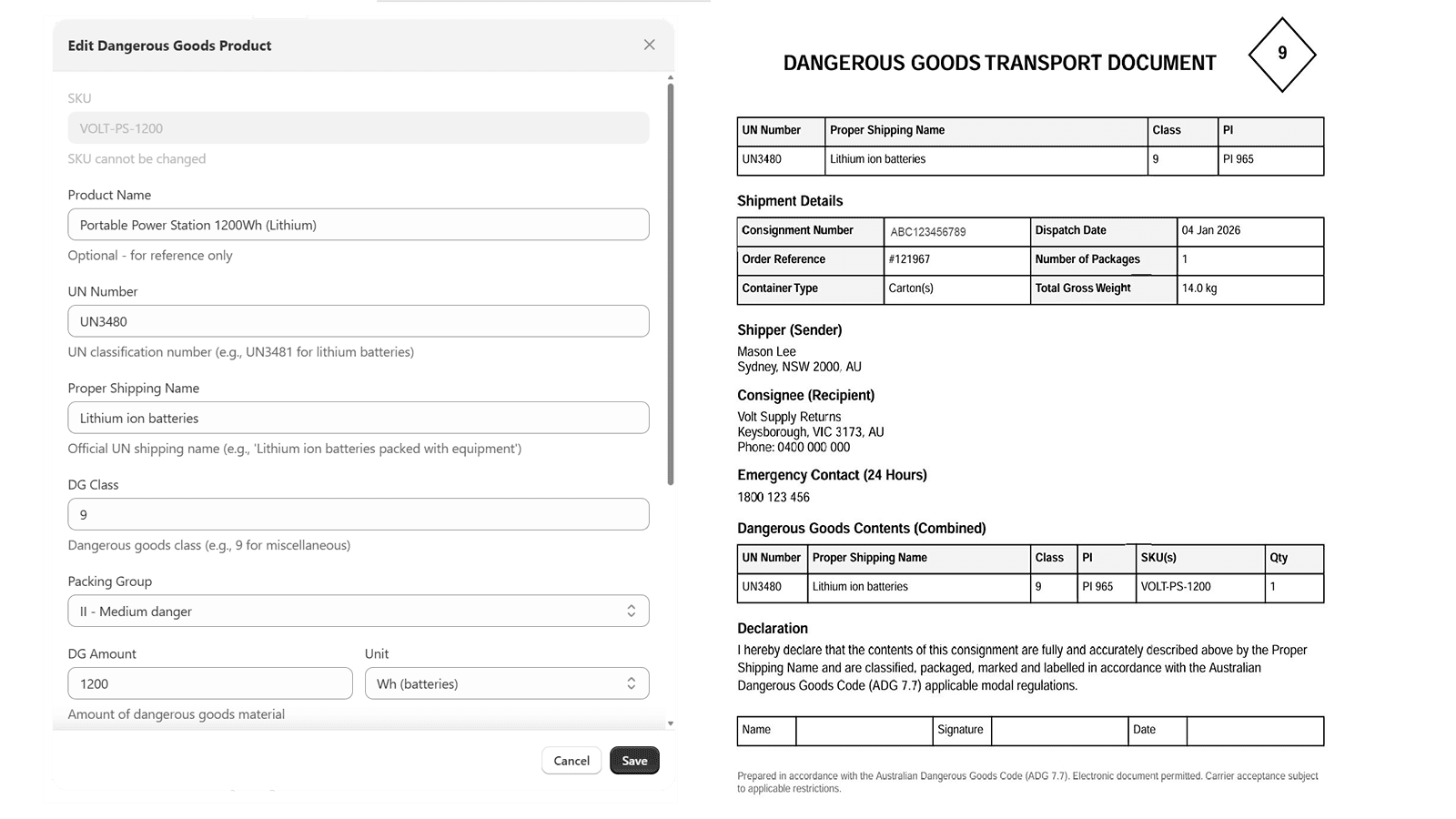
- Navigate to Settings → Product Catalog or edit via the RMA
- Find or add the product
- Enable Contains Dangerous Goods
- Select the DG classification:
- UN Number (e.g., UN3481)
- Packing Instruction (e.g., PI966)
- Proper Shipping Name
- Class/Division (e.g., 9 for lithium batteries)
Step 2: Set Battery Specifications
For lithium battery products, specify:
- Battery type: Lithium-ion or Lithium-metal
- Watt-hours (Wh): For Li-ion batteries
- Lithium content (g): For Li-metal batteries
- Number of batteries: Per unit
- Packed with or contained in: Equipment relationship
Battery specifications are usually found on the battery itself, product packaging, or manufacturer documentation. Watt-hours = Voltage (V) × Amp-hours (Ah).
Carrier DG Support
Not all carriers or service levels support dangerous goods. ReturnMate automatically restricts carrier choice for DG items:
| Carrier | DG Supported | Notes |
|---|---|---|
| Australia Post | No | Automatically blocked for DG items in ReturnMate |
| StarTrack | Yes | DG service up to 22kg per item; DG documentation generated automatically |
| TNT | Yes | Heavy DG (over 22kg) via road; air services have lithium battery restrictions |
| Team Global Express (TGE) | Yes | DG handled via shipment flags |
| Mainfreight | Yes | AU and NZ; suits heavy or palletised DG |
| FedEx / UPS (international) | Yes | Carrier-generated DG declarations where available (e.g. FedEx OP-900) |
When an RMA contains a DG-classified item, ReturnMate blocks non-DG carriers at label generation and suggests a DG-capable carrier for the destination and weight.
Section I vs Section II
Lithium batteries are classified into sections based on size:
Section II (Most Consumer Electronics)
Lower-risk batteries that can ship with simplified requirements:
Lithium-ion (Li-ion):
- Watt-hours: ≤100 Wh per battery
- Cells: ≤20 Wh per cell
Lithium-metal (Li-metal):
- Lithium content: ≤2g per cell
- Lithium content: ≤4g per battery
Requirements:
- DG label on outer package
- Handling label
- No shipper's declaration required (simplified)
Section I (Larger Batteries)
Higher-risk batteries requiring full DG compliance:
- Exceeds Section II limits
- Requires full shipper's declaration
- May require DG-certified packaging
- Higher shipping costs
- Some carriers won't accept
Many carriers refuse Section I lithium batteries entirely, or only accept them via ground transport. Verify carrier acceptance before processing returns.
Automated DG Declarations
When a return contains DG products, ReturnMate automatically:
- Identifies DG items from product configuration
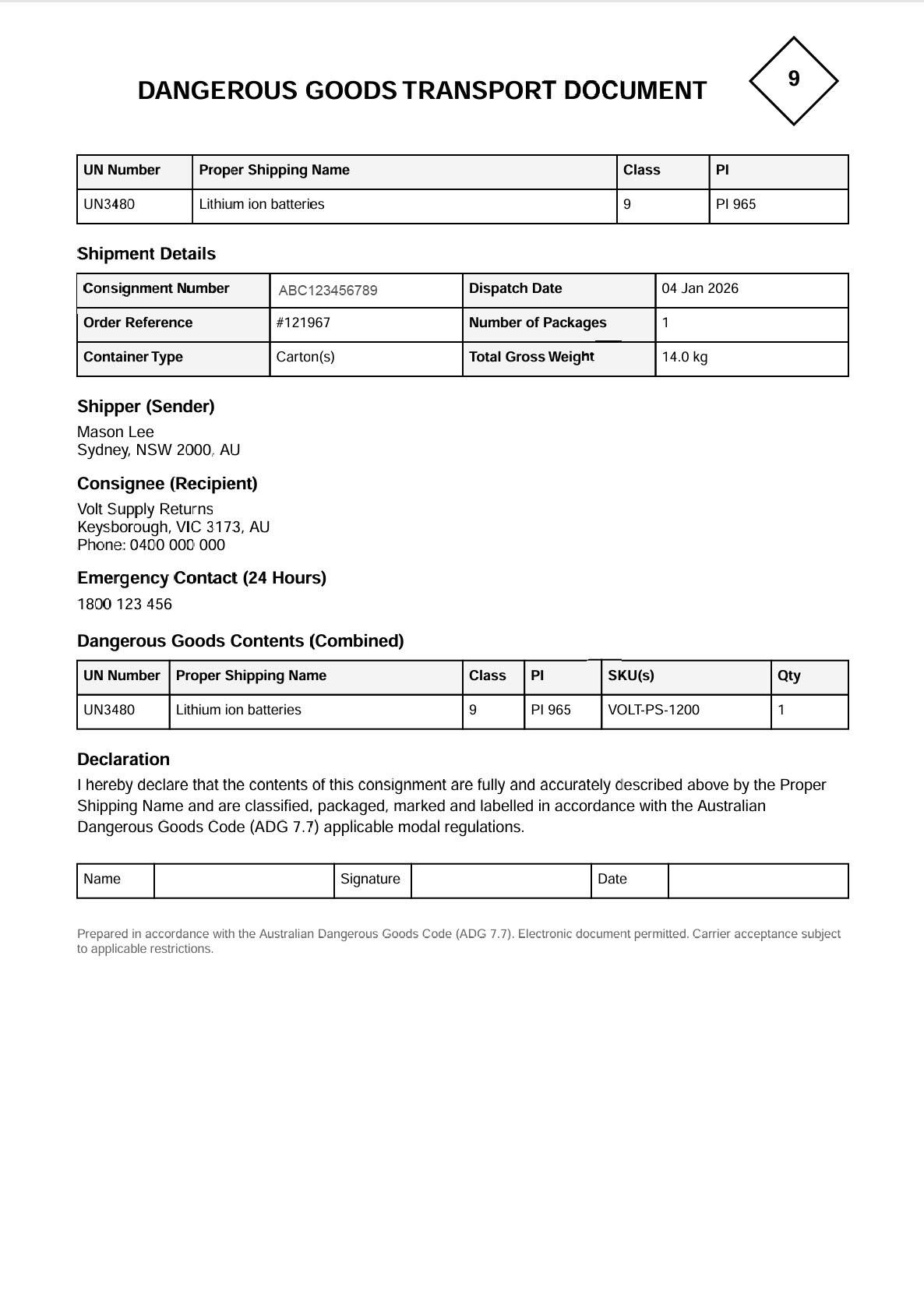
- Generates a Dangerous Goods Transport Document with correct UN numbers and packing instructions
- Applies DG labels to shipping labels where supported
- Calculates surcharges and adds to shipping cost
- Validates carrier acceptance before label generation
Where a carrier produces its own DG documentation (for example FedEx), ReturnMate stores the carrier's document. Otherwise ReturnMate generates the document itself, worded for the shipment's jurisdiction:
| Region | Document basis |
|---|---|
| Australia | Australian Dangerous Goods Code (Edition 7.9 — mandatory since 1 October 2025) |
| New Zealand | Land Transport Rule: Dangerous Goods 2005 (with ADG Code Edition 7.9 as applicable) |
| United States | US DOT 49 CFR hazardous materials shipping declaration |
| Canada | Transportation of Dangerous Goods Regulations (SOR/2001-286) |
| International | IATA / IMDG standards |
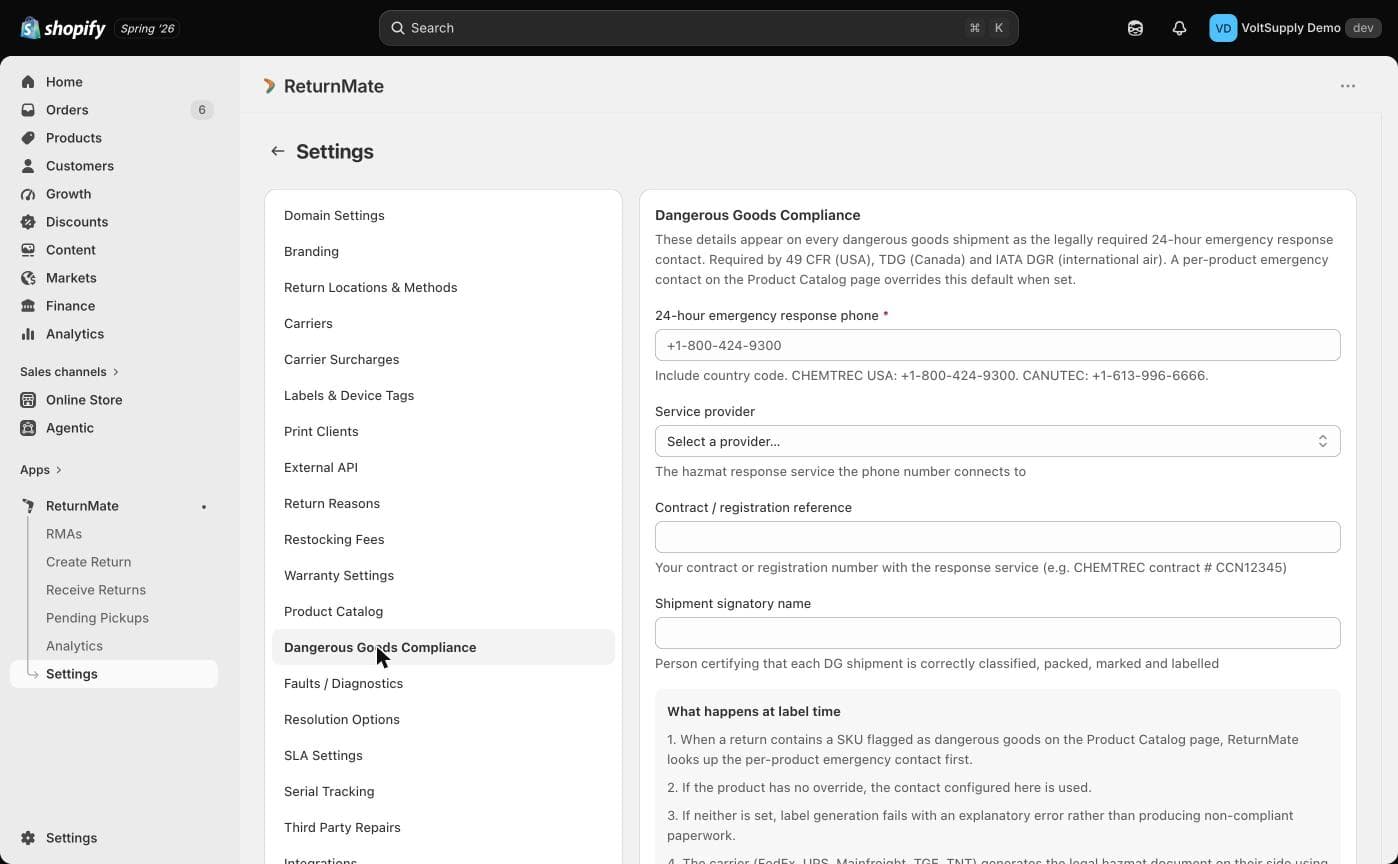
DG labels cannot be generated until a 24-hour emergency response contact is configured — either on the product, or shop-wide in Settings → Dangerous Goods Compliance (service provider, contract reference, emergency phone and signatory name). Label generation fails with an error if none is set.
DG Label Requirements
Packages containing lithium batteries must display:
- Lithium battery handling label (Class 9 hazard label)
- UN number (UN3481 or UN3091)
- Telephone number for emergency contact
- Shipper and consignee details
Handling DG Returns
Customer Instructions
When a customer initiates a return for a DG product:
- Clear packaging instructions are provided
- Battery requirements specified (e.g., charge level 30%)
- Original packaging recommended where possible
- Damage inspection guidance for safe shipping
Warehouse Receiving
When DG returns arrive at your warehouse:
- Inspect packaging for damage or leakage
- Verify declarations match actual contents
- Quarantine damaged items per safety protocols
- Document condition with photos
Never accept or open packages with signs of battery damage (swelling, heat, smell, leakage). Follow your dangerous goods safety procedures.
Compliance Requirements
Documentation Retention
Keep records of:
- DG declarations for each shipment
- Product DG classifications
- Carrier acceptance confirmations
- Any incidents or exceptions
Training
Staff handling DG shipments should understand:
- How to identify DG products
- Proper packaging requirements
- Emergency procedures
- Carrier-specific requirements
Regulations
Australian DG shipping is governed by:
- Australian Dangerous Goods Code (Edition 7.9 — mandatory since 1 October 2025)
- IATA Dangerous Goods Regulations (air transport)
- Carrier-specific policies
Troubleshooting
Label Generation Fails for DG Items
Cause: Carrier doesn't support the DG classification or service level.
Solution:
- Check carrier DG support matrix above
- Try alternative carrier or service
- Verify product DG configuration is correct
- Contact carrier for specific requirements
DG Surcharge Not Applied
Cause: Product not configured as dangerous goods.
Solution:
- Edit product configuration
- Enable DG flag and set classifications
- Regenerate shipping label
Customer Can't Ship DG Item
Cause: Drop-off location doesn't accept DG, or carrier restrictions.
Solution:
- Provide alternative drop-off locations
- Arrange carrier pickup instead
- Use different carrier with DG support
Best Practices
- Maintain accurate product DG classifications
- Train staff on DG identification and handling
- Use carriers that support your DG requirements
- Include clear DG instructions in customer communications
- Regularly audit DG compliance and documentation
- Have procedures for damaged battery incidents