Staff-Created Returns
Create and manage returns on behalf of customers via phone, email, or in person.
3 min read
Last updated 3 April 2026
Staff-Created Returns allow your team to create RMAs on behalf of customers. This is useful when customers contact you by phone, email, or in person and you need to initiate the return process for them.
When to Create a Return Manually
- Customer contacts you by phone or email requesting a return
- Customer is in-store and needs a return processed
- You need to initiate a return proactively (e.g. product recall)
- The customer is unable to use the self-service portal
How to Create a Staff Return
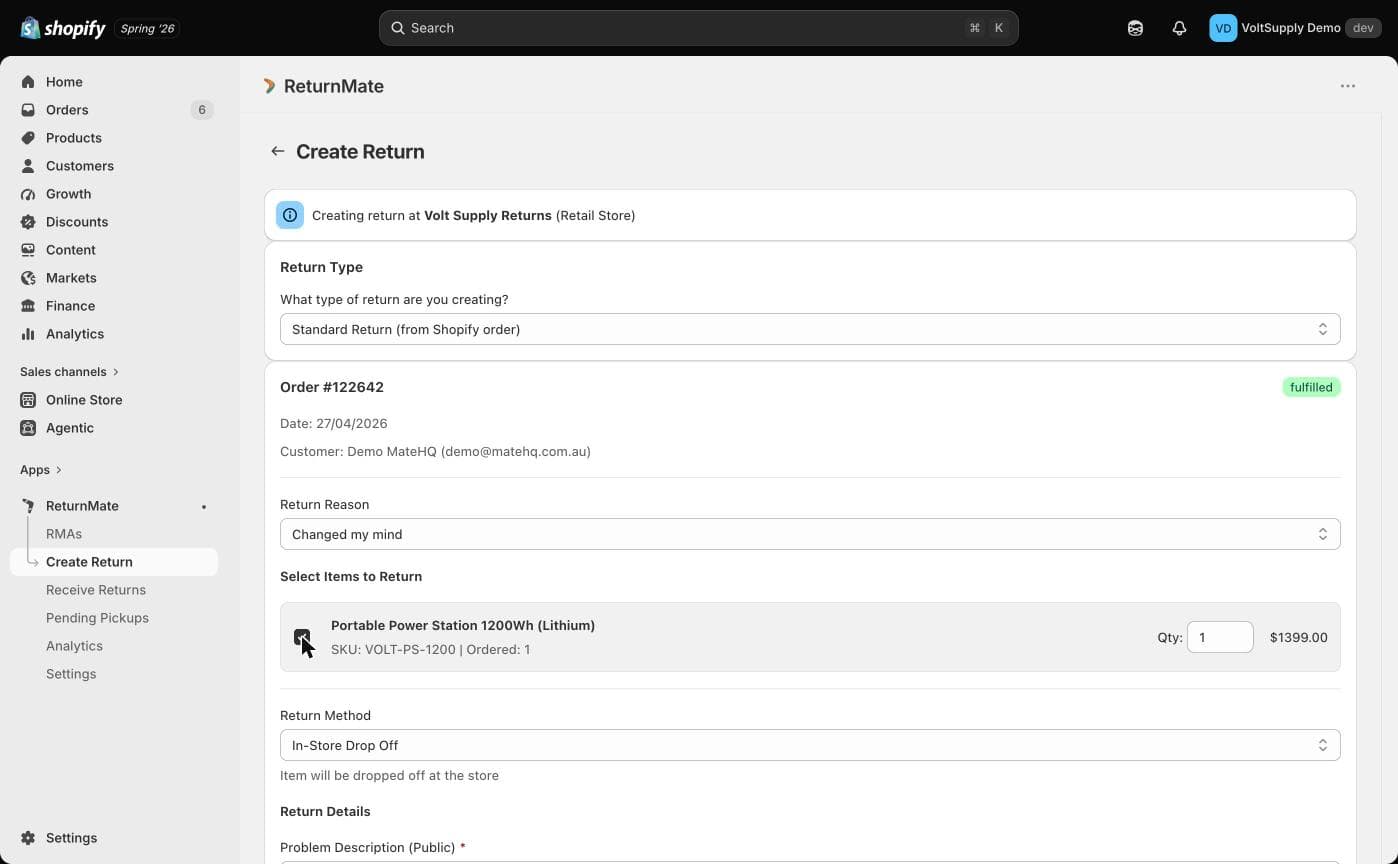
Start the RMA
- Go to Create RMA
- Search for the customer's Shopify order
- Select the items being returned
Set Return Details
- Choose the return reason
- Select the return method:
| Method | Description |
|---|---|
| Prepaid label | Generate and send a return shipping label |
| Customer's own courier | Customer arranges their own shipping |
| In-store drop-off | Customer brings item to a store location |
| Remote resolve | Resolve without requiring the item back |
- Add staff notes explaining the context
- Override photo requirements if needed
Submit
Submit the RMA. Depending on the return method selected:
- Prepaid label: The RMA is approved and a label is generated automatically
- Own courier: The RMA is approved, customer provides tracking later
- In-store: The RMA is approved, awaiting customer drop-off
- Remote resolve: The RMA is resolved immediately
Staff Overrides
When creating returns manually, staff have additional capabilities:
| Override | Description |
|---|---|
| Skip photo requirement | Process returns without customer photos |
| Add diagnostics directly | Enter initial diagnostic notes at creation |
| Pre-mark items | Mark items as already received if in hand |
| Staff notes | Add internal context not visible to customers |
Use staff notes to record why a return was created manually. This helps other team members understand the context if they pick up the case later.
After Creation
Staff-created returns follow the same workflow as customer-initiated returns. The primary action depends on the return method and current status:
| Return Method | Next Step After Creation |
|---|---|
| Prepaid label | Await customer shipment |
| Own courier | Await tracking number upload |
| In-store | Mark as received when customer drops off |
| Remote resolve | Close the RMA |
Related Articles
Was this helpful?
Contact Support